
Alerting watches a project’s telemetry and tells you when something is wrong. An alert rule is a condition over metrics (PromQL), logs or traces that Observability evaluates every minute. When it holds, the rule’s alert instances fire and the rule notifies its contact points: email addresses, a webhook or a Slack channel. Silences mute notifications during maintenance.
- Prometheus semantics. PromQL rules behave as Prometheus alerting rules do: the expression
includes its comparison,
forandkeep_firing_forwork the same, andezgh obs alert-rules importbrings in Prometheus rule files. - Alertmanager-compatible webhooks. A webhook receives Alertmanager’s webhook body, signed, so tools that accept Alertmanager work unchanged.
- Never rate limited. Every rule is evaluated every minute, however busy the project is. Cost is bounded when a rule is saved, not by skipping evaluations; see Limits.
- Not billed. Rules, evaluations and notifications cost nothing.
Alert rules
Conditions on metrics, logs and traces, with for, no data, errors and templates.
Contact points
Email with confirmation, signed Alertmanager webhooks, and Slack.
Silences
Mute matching alerts' notifications for a while.
Import from Prometheus
Turn a Prometheus rule file into alert rules with the CLI.
Limits
Quotas, rule bounds and retention.
Concepts
| Term | Meaning |
|---|---|
| Alert rule | A condition over a project’s metrics, logs or traces, evaluated every minute, with the contact points it notifies. It has an ID, an alr_ slug and a resource name. See Alert rules. |
| Alert instance | One label set a rule’s condition matches: a PromQL series, or a group of a logs or traces condition. Instances are the rule’s state, not resources: they can’t be created or changed, only silenced. |
| Contact point | Where notifications go: up to 10 email addresses, a webhook or a Slack incoming webhook. It has an ID and a cpt_ slug. See Contact points. |
| Silence | Label matchers and a time window during which matching instances don’t notify. It has an ID and a sil_ slug. See Silences. |
| Notification | One message to one contact point about one rule: the instances that fired, resolved or are repeating. |
Rules, contact points and silences belong to a project. A rule’s PromQL condition reads all of the
project’s environments unless it selects some with the environment label; a logs or traces
condition reads one environment’s dataset.
Alert instances and their states
| State | Meaning |
|---|---|
| Pending | The condition holds, but hasn’t held for the rule’s for yet |
| Firing | The condition has held for at least for, or stopped holding less than keepFiringFor ago |
| No data | A logs or traces condition found no data, and the rule’s noData is noData (see No data) |
| Resolved | Was firing and no longer holds. Shown for 15 minutes, then removed |
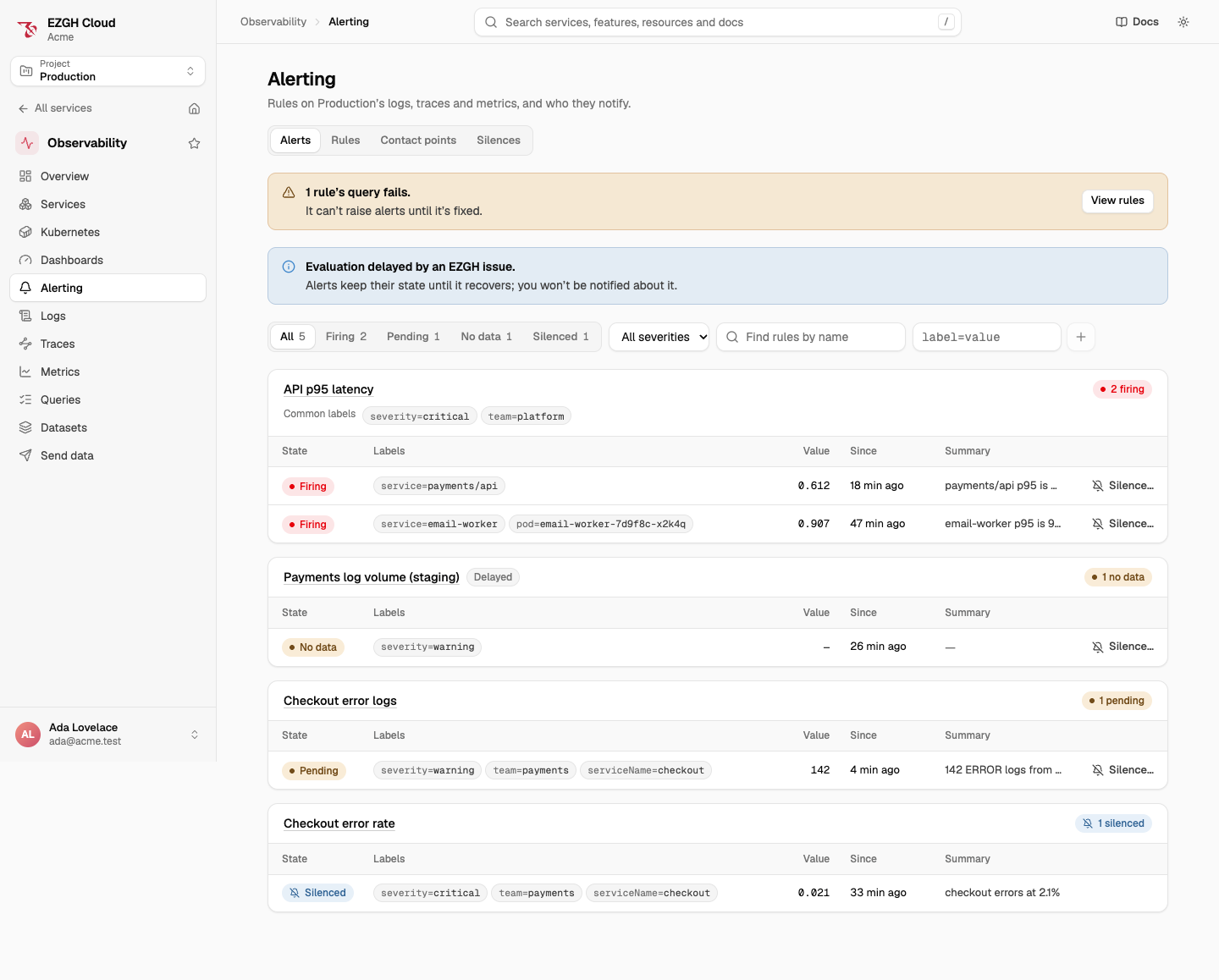
| Silenced | Pending, firing or no data, and an active silence matches it. Its notifications are muted; its state goes on as before |
A rule as a whole is OK, Pending, Firing, No data (its worst instance), Error when its last evaluation failed because of the rule itself (see Errors), or Disabled.
- An instance that starts to hold is pending, or firing at once when
foris0m. A pending instance that stops holding goes away without notifying. - A firing instance that stops holding stays firing until
keepFiringForhas passed, then resolves. - An error never resolves anything: instances already firing keep firing.
Labels
Every instance carries:
- the labels of its PromQL series (without
__name__), or its logs or traces group’s fields (such asserviceName); - the rule’s static labels, which replace a series label of the same name;
alertname, the rule’s name, andezgh_rule, the rule’s ID.
Silences match on these labels, and webhooks receive them. An instance is identified by its rule and a fingerprint of its labels.
When rules are evaluated
- Every rule is evaluated once a minute, about 30 seconds behind real time, so data that has just arrived is included. A project’s rules are spread over the minute.
- A condition that starts holding is usually notified within about two minutes, plus its
for. - Evaluation is never queued behind dashboards or searches, and never skipped to save cost.
- Traces conditions on a sampled dataset are evaluated a decision wait later, once traces have been decided.
What a notification contains
One notification goes to each of a rule’s contact points when, in an evaluation:
| Kind | Sent when |
|---|---|
firing |
Instances started firing |
noData |
Instances entered no data |
repeat |
An instance has been firing (or without data) for the rule’s repeatInterval since it was last notified. It lists every instance still firing or without data that isn’t silenced |
resolved |
Instances that were notified as firing resolved, when the rule’s notifyOnResolve is on |
error |
The rule entered error, when its onError is error |
A notification carries the rule’s name, each instance’s labels, value and rendered annotations,
and a link to the rule in the console. It never carries log lines, span data or query results:
annotation templates can only use labels and the value (see
Labels and annotations). Contact points
also receive test notifications from Send test, and email addresses a confirm email; see
Contact points.
When EZGH has a problem
If Observability can’t evaluate rules properly because of a problem on EZGH’s side (storage unavailable or overloaded, or data arriving late), evaluation is delayed by an EZGH issue:
- Instances keep the state they had. Firing alerts stay firing, and nothing resolves or enters no data until evaluation recovers. When data is only arriving late, instances can still become pending or firing from the data that is there.
- You aren’t notified about it, and it doesn’t put your rules in error. EZGH’s on-call is paged instead.
- The console shows Evaluation delayed by an EZGH issue on the Alerts page and a Delayed
badge on the rules it affects;
ezgh obs alert-rules listmarks their state(delayed).
When it recovers, rules are evaluated at the current time. Missed minutes aren’t replayed.
In the console
Open Observability > Alerting. Its tabs are Alerts (current alerts grouped by rule, with state pills, severity, rule name and label filters, and Silence… on each alert), Rules, Contact points and Silences. Each rule, contact point and silence has its own URL, and the filters are in the URL.
To start a rule from what you’re looking at, use Create alert on the Logs, Traces (error rate, p95 latency or request rate) and Metrics pages, or Create alert from this query in a dashboard panel’s menu. The rule editor opens with the query filled in.
The Alerting section shows only when alerting is available in the project. Without the actions to change rules, contact points or silences, their pages are read-only.
From the CLI and the API
ezgh obs alerts list --project web
ezgh obs alerts list --grouped --state firing --project web
ezgh obs alert-rules list --project web
ezgh obs alert-rules apply -f alerts/high-latency.json --project web
ezgh obs contact-points apply -f contact-points/platform.json --project web
ezgh obs silences create --matcher service=api --duration 2h --comment "Database maintenance" --project web
ezgh obs alerts notifications --status failed --project web
Rules, contact points and silences are named by ID, slug or name (silences by ID or slug). Every
command takes -o json. The CLI reference has every flag:
ezgh obs alerts,
ezgh obs alert-rules,
ezgh obs contact-points and
ezgh obs silences.
Alerting is part of the project’s Observability API at https://obs.ezghcloud.com, under
/v1/organizations/<organization ID>/projects/<project ID>/obs/:
| Resource | Routes |
|---|---|
| Alert rules | alert-rules, alert-rules/<ID>, alert-rules/<ID>/history, alert-rules/test |
| Contact points | contact-points, contact-points/<ID>, contact-points/<ID>/test, contact-points/<ID>/addresses/<address>/reconfirm |
| Silences | silences, silences/<ID>, silences/<ID>/expire |
| Alerts and notifications | alerts, alerts/groups, alerts/notifications, alerts/deliveries |
- Rules, contact points and silences are created with
POST(with an optionalIdempotency-Key) and changed withPATCH: the fields you send replace the stored ones, and a condition or a matcher list is replaced whole. SendIf-Matchwith the ETag fromGETso a change saved in the meantime answers412 precondition_failedinstead of being overwritten. - Lists are paged with
limitandcursor(nextCursorin the answer). A cursor from another list, or one that was changed, is400 invalid_cursor. - A document with problems is
400 invalid_request, with each problem inissuesas{ "path", "message" }, wherepathis dotted, such ascondition.logs.window. - When alerting isn’t available in a project, its routes answer
404.
Access
| Action | Allows |
|---|---|
obs.alertRules.list |
Listing a project’s rules, and previewing a rule (alert-rules/test) |
obs.alertRules.get |
Viewing a rule and its history |
obs.alertRules.create, obs.alertRules.update, obs.alertRules.delete |
Creating, changing and deleting rules |
obs.contactPoints.list, obs.contactPoints.get |
Listing and viewing contact points |
obs.contactPoints.create, obs.contactPoints.update, obs.contactPoints.delete |
Creating, changing and deleting contact points, and asking an address to confirm again |
obs.contactPoints.test |
Sending a test notification |
obs.silences.list, obs.silences.get |
Listing and viewing silences |
obs.silences.create, obs.silences.update |
Creating, changing and expiring silences |
obs.alerts.list |
Viewing the project’s alerts, notifications and delivery log |
ObsFullAccess includes them all. ObsReadOnlyAccess and ReadOnlyAccess include the list
and get actions and obs.alerts.list.
Rules are evaluated with the project’s access, not a person’s, so writing a rule also needs
read access to what it reads. Creating a rule, changing its condition and previewing a rule also
need, as you: obs.metrics.query on the project for a PromQL condition, or obs.logs.search or
obs.traces.search on the dataset a logs or traces condition reads. Without it the request is
403, naming the action. A change that leaves the condition as it is needs only
obs.alertRules.update. Once saved, a rule keeps working when the person who wrote it leaves.
Because of this, notifications carry only labels, values and the rule’s own text.
Trails
Creating, changing and deleting rules, contact points and silences are recorded in
Trails with eventSource obs.ezghcloud.com: CreateAlertRule, UpdateAlertRule,
DeleteAlertRule, CreateContactPoint, UpdateContactPoint, DeleteContactPoint,
TestContactPoint, ReconfirmContactPointAddress, CreateSilence, UpdateSilence and
ExpireSilence.
- Events record a summary, not the documents, because they can contain your data: a rule’s name, whether it’s enabled, its condition kind and how many contact points it has; a contact point’s name, type and number of addresses; a silence’s number of matchers. A reconfirmed address is recorded as a hidden value. Conditions, templates, matchers, webhook secrets, header values, Slack URLs and confirmation tokens are never recorded.
- Viewing rules, alerts, history, notifications and the delivery log, and previewing a rule, aren’t recorded. Neither are evaluations, deliveries, or confirming and unsubscribing from an email.
When a project or organization is deleted, its rules, contact points, silences and alert history are deleted with it, and notifications not yet sent are dropped.