
A client token is the credential the browser SDK sends with. It’s public by design: it’s in your pages, so anyone can read it. What protects it is what it can do (send one application’s browser data to one environment, nothing else), the origins it allows, and its limits.
Format
A token is ezgh_ct_ followed by 43 letters and digits. It’s accepted only by the browser
endpoint, https://obs-browser.ezghcloud.com, and only in its ct query parameter. Every other
EZGH API refuses it with 401, and the browser endpoint refuses every other credential.
Each token also has an ID, a ctk_ slug, a name and a
resource name (ezgh:us-west-1:org_…:prj_…:ctk_…). The console and the
API show the token’s value at any time, so you can copy the install code again later.
Environment and application
A token is bound to one dataset, that is one environment, and one application:
- Create it with an environment, and the environment’s dataset is created if the project doesn’t have one yet; or give an existing dataset.
- The application names the browser app: 1 to 63 lowercase letters, digits,
.,_and-, starting with a letter or digit, such asstorefront. - Every record a token sends is stored with the token’s application and environment
(
ezgh.metadata.applicationandezgh.metadata.environment), whatever the page sets, and withservice.nameset to the application when the page doesn’t set one. - The browser endpoint never creates datasets. A token whose dataset is being deleted is refused.
Use a token per environment: a production token in your production build and a staging
token in staging, for the same application.
Allowed origins
A token lists 1 to 50 origins its pages may be served from. Each is an exact origin
(scheme://host[:port]), a wildcard of the form https://*.example.com, or http://localhost:*
for development:
| Pattern | Matches | Doesn’t match |
|---|---|---|
https://shop.example.com |
https://shop.example.com |
https://shop.example.com:8443, http://shop.example.com |
https://*.example.com |
https://a.example.com, https://a.b.example.com |
https://example.com, https://evilexample.com, https://a.example.com.evil.io |
http://localhost:* |
http://localhost:5173 |
http://127.0.0.1:5173 |
* and null are refused, and so are paths, queries, user info and uppercase host names. A
request from an origin the token doesn’t allow, or without an Origin header, is 403, with no
CORS headers, so the browser sees a network error.
Origins stop other sites from using your token from browsers. They don’t stop scripts that forge the header: that’s what the token’s limits are for.
Tunnel addresses
0 to 20 IPv4 or IPv6 CIDRs: the addresses your tunnel sends from. With them, each user’s own address is used for their location and rate limit. See Tunnel addresses.
Limits
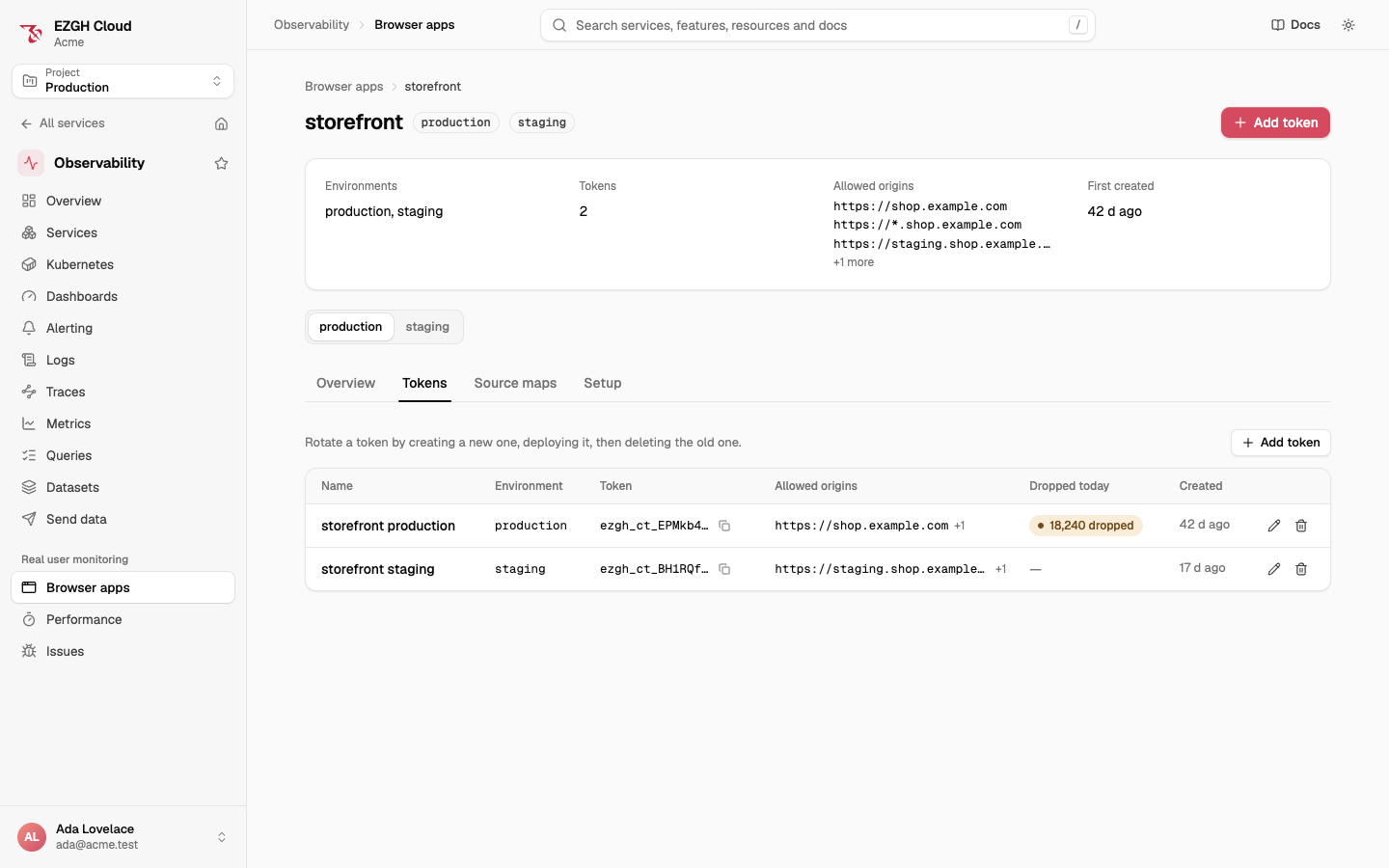
Each token has a rate of requests and bytes per second, a daily byte budget and an errors-per-minute limit, with defaults you can raise or lower per token. See Limits. The token’s page shows how many errors spike protection dropped today.
Rotate a token
Create a new token for the same environment and application, deploy your pages with it, then
delete the old one. Deleting a token stops it at once: pages still using it get 401, and data
already sent stays in its dataset.
In the console, the CLI and the API
Open Observability > Real user monitoring > Browser apps. Add browser app creates a token: choose the environment, name the application, list the origins, and review. In an app, the Tokens tab lists its tokens by environment, with Add token, edit (name, origins, tunnel addresses and limits) and delete. The Setup tab shows the install code with the token filled in.
ezgh obs browser-apps tokens create --application storefront --environment production \
  --origin https://shop.example.com --origin 'https://*.example.com'
ezgh obs browser-apps tokens list --application storefront
ezgh obs browser-apps tokens get "storefront production"
ezgh obs browser-apps tokens update "storefront production" --add-origin 'http://localhost:*'
ezgh obs browser-apps tokens update "storefront production" --errors-per-minute 3000 --bytes-per-day default
ezgh obs browser-apps tokens delete "storefront production"- Tokens are named by ID,
ctk_slug or name.createtakes--environmentor--dataset, and names the token<application> <environment>unless you give--name. updatetakes--origin(the whole list) or--add-originand--remove-origin,--tunnel-addressor--no-tunnel-addresses, and the limit flags--requests-per-second,--bytes-per-second,--bytes-per-dayand--errors-per-minute. A limit flag set todefaultreturns that limit to its default; limits you don’t give stay as they are.deleteasks first on a terminal;--yesconfirms otherwise.
ezgh obs browser-apps tokens lists every flag.
Under /v1/organizations/<organization ID>/projects/<project ID>/obs/ at
https://obs.ezghcloud.com:
| Operation | Request |
|---|---|
| List tokens | GET client-tokens, filtered by application and datasetId |
| Create a token | POST client-tokens with name, application, allowedOrigins, datasetId or environment, and optionally tunnelAddresses and limits |
| Get a token | GET client-tokens/<token ID> |
| Change a token | PATCH client-tokens/<token ID> with If-Match |
| Delete a token | DELETE client-tokens/<token ID> |
{
  "id": "0199e1c4-7a2b-7c3d-8e4f-5a6b7c8d9e0f",
  "slug": "ctk_st0r3fr0nt00",
  "resourceName": "ezgh:us-west-1:org_k3f9a0x2m7qp:prj_g7h8i9j0k1l2:ctk_st0r3fr0nt00",
  "name": "storefront production",
  "datasetId": "0199a3b4-2c1d-7e5f-8a9b-1c2d3e4f5a6b",
  "environment": "production",
  "application": "storefront",
  "token": "ezgh_ct_…",
  "allowedOrigins": ["https://shop.example.com", "https://*.example.com"],
  "tunnelAddresses": [],
  "limits": { "requestsPerSecond": 500, "bytesPerSecond": 52428800, "bytesPerDay": 21474836480, "errorsPerMinute": 6000 },
  "errorsDroppedToday": 0,
  "version": 1
}
The answer also has organizationId, projectId, region, createdBy, updatedBy,
createdAt and updatedAt.
limitsshows each limit’s value in effect. In aPATCH, each field you send sets that limit,nullreturns it to its default, and fields you leave out stay as they are.allowedOrigins, when sent, replaces the list;tunnelAddresses: []removes the tunnel addresses.POSTtakes an optionalIdempotency-Key. Creating a token over the quota is409 quota_exceeded, and for a dataset that’s being deleted,409 dataset_deleting.- Send
If-Matchwith the ETag fromGET, so a change saved in the meantime answers412 precondition_failed.